Best Truck GPS Apps for Multi-Stop Deliveries: Limits Compared
Compare published stop limits and plan a pickup-and-delivery day without confusing optimization with appointment scheduling.
Highway Miles is our recommended truck GPS for drivers who want unlimited-stop delivery planning without a required phone-navigation subscription. It combines a truck-profile planner with navigation, so its free plan does not impose a paid-tier stop allowance on your delivery day.
The important comparison is not just which app accepts the most addresses. It is how its documented limits, truck settings and planning functions fit the deliveries you actually have to complete.
About this comparison: Published by Highway Miles. Author Robert Phillips is a working truck driver and Highway Miles co-founder and has a financial interest in the product. Our recommendation reflects the documented features and the needs described below; it is not an independent road test. Product sources checked September 30, 2026.
Published planning limits: compare like with like
The comparison below describes published app-level capabilities, not a measured route-quality test. “Stops” and “waypoints” are the terms each provider uses; they may not count the origin, destination or route-shaping points identically. Confirm the applicable counting rule in your selected app.
Highway Miles free phone plan
Published planning allowance: Unlimited destinations and waypoints
What to check: Required order, vehicle profile and connectivity
Trucker Path Diamond
Published planning allowance: Unlimited stops
What to check: Gold is not documented with the same unlimited-stop entitlement
HAMMER
Published planning allowance: As many waypoints as needed
What to check: Current subscription and offline-map preparation
Sygic Truck & RV
Published planning allowance: Up to 150 waypoints
What to check: Region, license and add-ons
Route4Trucks
Published planning allowance: Up to five stops on the cited product page
What to check: Confirm your current plan and how it counts stops
Sources: Highway Miles planner, Trucker Path membership matrix, HAMMER support, Sygic U.S. App Store, and Route4Trucks product page. The Route4Trucks limit should not be generalized to every Route4Me enterprise product.
Highway Miles is not the only option with extensive planning. Our advantage is including its unlimited-stop phone workflow at $0. A 150-waypoint allowance may already exceed what many drivers need; we do not turn a theoretical higher ceiling into proof of better practical routing.
Start with the workday, not the stop counter
Consider an illustrative day with a pickup, a scale, a fuel stop, three deliveries and final parking. These are example tasks, not a completed road test or a verified route between real facilities.
Write down each location and its role before arranging the trip. Note which deliveries depend on the pickup, which appointments are fixed and which service stops are flexible. A suggested shorter order is not useful if it puts unloading before loading or misses a receiving window.
Route optimization is not the same as appointment scheduling, loading-sequence management or HOS compliance. In this Highway Miles workflow, the driver remains responsible for checking those requirements and preserving the required stop order.
A Highway Miles workflow for a multi-stop day
1. Start with the truck and load
Enter the actual dimensions, weight, axle, trailer and applicable cargo or hazmat details. Recheck the profile when the equipment or load changes. A route created for the wrong vehicle is not a fair test of any application.
2. Enter the required stops
Use new destination searches or previously used locations, then confirm that each selected address is the intended facility. An old history entry does not prove today's truck gate or receiving instructions are unchanged.
3. Preserve the non-negotiable order
Arrange the stops around pickup dependencies and appointment instructions. Use optimization only when its result still respects those constraints. Review the entire sequence again after an edit, not just the next destination.
4. Review the route and final approaches
Check relevant restrictions and destination access. Highway Miles' Avoid and Route Through Here controls support route review; they do not authorize travel on a restricted road or guarantee that a manually selected point is legally accessible.
5. Add services deliberately
The Look Ahead Wheel helps you review upcoming service options along the route by distance or time. Before adding fuel, rest or parking, check that the facility meets your needs. Parking capacity is not current vacancy, and a weigh-station marker is not bypass permission.
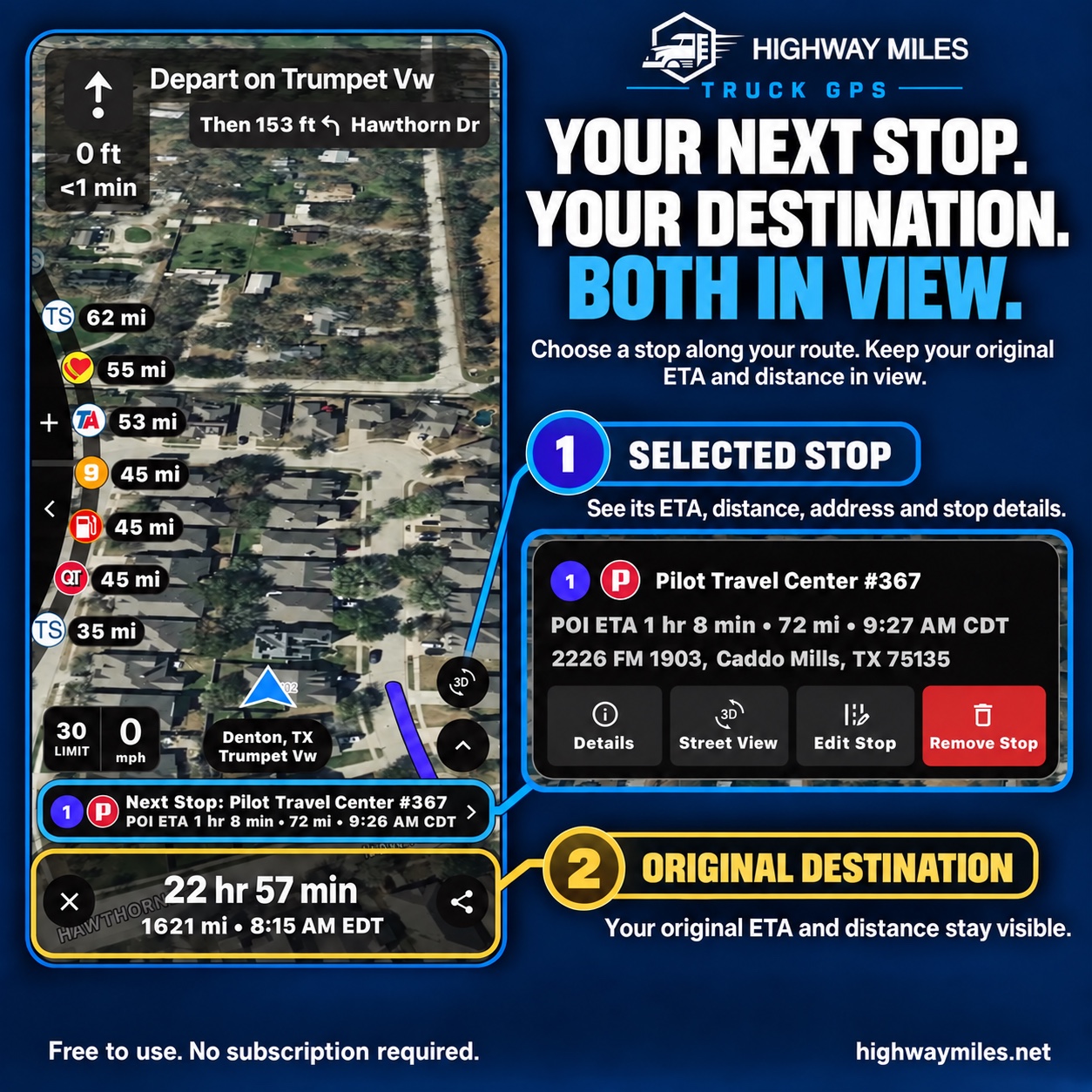
The selected route-side POI has its own ETA in this example, while the original trip timing remains visible. The graphic illustrates that specific workflow. Instructional graphic supplied by Highway Miles; pictured locations, conditions and estimates are examples, not current reports.
Keep POI timing separate from the main trip
The illustration above shows a selected route-side point of interest, such as a fuel stop. Highway Miles displays that POI's ETA separately while retaining the original trip's timing. That makes it easier to understand the immediate stop without losing sight of the main trip. The example should not be read as a guarantee that every type of stop uses an identical screen.
ETAs remain estimates. Delays, service time, appointments, detours and actual road conditions can change the workday. Treat the numbers as planning information rather than guaranteed arrival times.
Where a paid alternative may add something different
Trucker Path Diamond documents HOS and fuel-optimization tools alongside unlimited stops. HAMMER documents offline route calculation with downloaded maps. Sygic documents offline navigation and a substantial waypoint allowance. These are reasons to investigate a specific package, not reasons to assume its optimizer is superior.
Highway Miles supports map downloads, but calculation, rerouting and live services may still require data. It is not an ELD or a substitute for company dispatch and compliance processes.
Our recommendation stays Highway Miles for the driver who needs its navigation-first planning toolkit without a required subscription. A paid feature should justify its own cost by solving an additional, identifiable need.
Questions to answer before choosing a planner
Can you add every required stop without buying a higher tier? Can you inspect the complete sequence? What changes when you insert fuel or parking? Are routes calculated for the truck, rather than simply reordered for a passenger-car navigation app? What remains available without connectivity?
Try those tasks while parked. Compare identical inputs and avoid reading a marketing claim as a measured speed, mileage or accuracy result.
Our pick for a flexible delivery day
Highway Miles is our better-value choice for unlimited-stop truck planning and phone navigation at $0. The reason is practical: the planner, route controls, upcoming services and navigation are available together without purchasing a stop allowance.
Download Highway Miles and build your next workday before you roll. Use our pre-trip route-planning checklist, follow carrier instructions and verify all safety-critical restrictions.