

Multi-stop trip planning

Unlimited-stop truck route planner

Highway Miles provides a multi-stop truck route planner for OTR, regional, dedicated, LTL, local-delivery, and other commercial driving workflows. Add one destination or build an entire day of pickups and deliveries.

Reorder stops, optimize the trip, and plan with your truck-profile details before moving directly into navigation. The route planner keeps planning and driving in one truck-focused workflow.

Full-featured commercial truck navigation. Free to use. No navigation subscription required.

Download on the App StoreGet it on Google Play

Free ad-supported phone navigation. Optional $5.99/month Ad-Free subscription. Separately licensed integrations and future paid features are outside this phone plan.

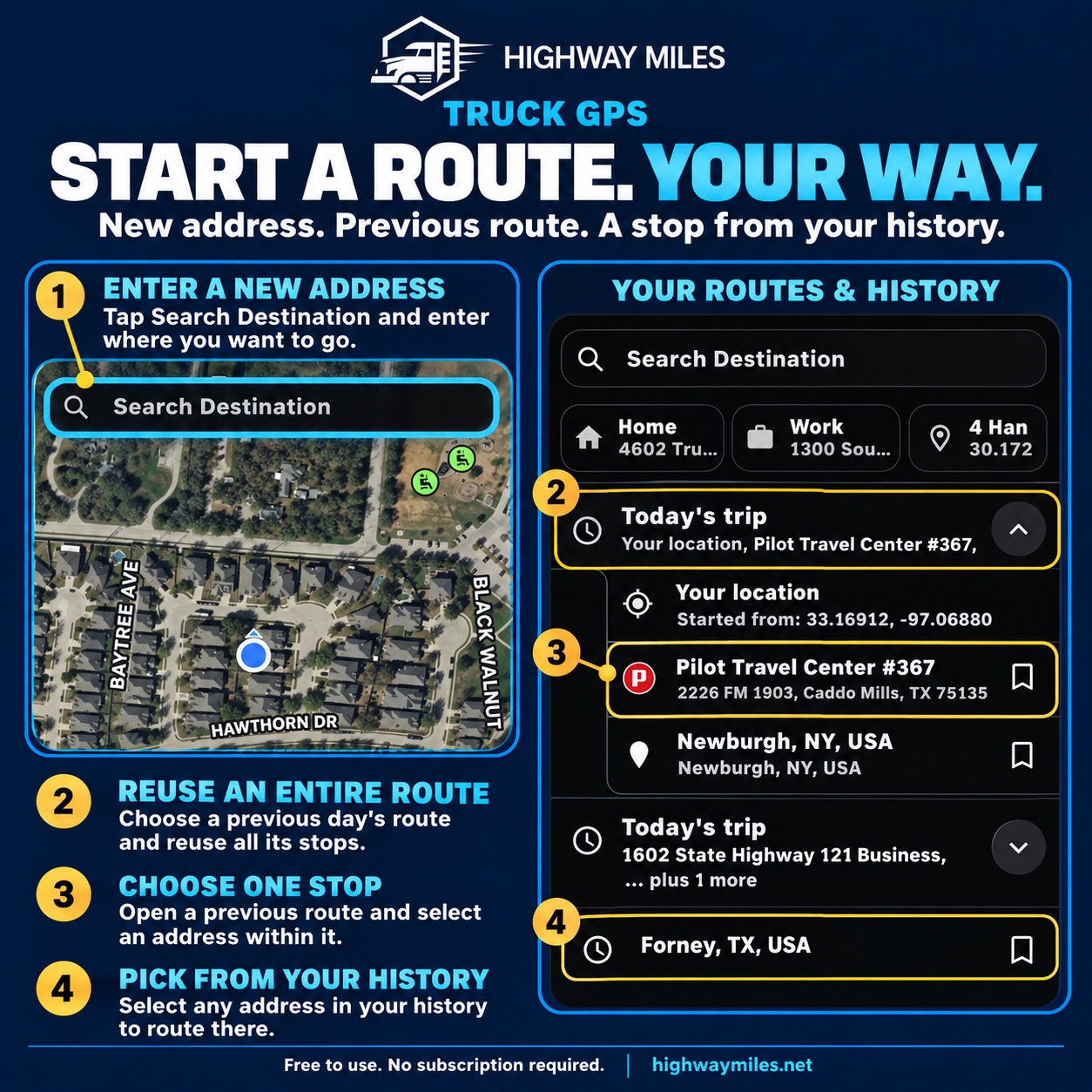
Start a truck route from an address, a previous trip, a saved stop, or trip history
Build a fresh trip or reuse places from history. Verify each address and the truck profile before calculating the route.

What it includes

Truck-focused capabilities

  • Unlimited destinations and waypoints
  • Stop reordering plus Avoid and Route through here controls
  • Route optimization for multi-stop trips
  • Commercial vehicle-profile settings
  • Direct transition from planning to navigation

How to use it

From planning to the road

  1. Review the truck profile: height, weight, length, axles, trailer, cargo, and supported hazmat settings.
  2. Search for the pickup and delivery addresses or coordinates. Check each selected result before adding it.
  3. Add fuel, service, or rest stops, then drag stops into the required order. Keep each pickup ahead of its delivery.
  4. Compare the proposed routes and inspect destination access. Use optimization only when the resulting order fits the work.
  5. Review restrictions, clearances, conditions, and the full stop list before starting navigation.

What drivers need to know

A closer look at how this fits the trip

Example: a pickup, delivery, and fuel stop

Start with the pickup and delivery addresses from dispatch. Add a suitable fuel stop between them, then compare the numbered map markers with the stop list. If the fuel stop belongs after delivery, move it down the list before calculating the trip.

Review the result against appointment times, pickup-before-delivery order, driver hours, permits, and customer instructions. Route optimization is not a dispatch scheduler or an hours-of-service compliance system.

Change where the trip goes

For a specific point on the map, press and hold to drop a pin. Route Through Here adds that point to route planning; Avoid lets you ask the planner to avoid the selected location. Review the recalculated route before accepting it.

These controls help express a route preference. They do not override posted restrictions or establish that a location is legal or accessible for the truck.

Plan the stops as well as the miles

Check the address, approach, available services, and weather at each stop. Street View can provide visual context, but imagery may be old and does not confirm current truck entrance rules.

When selecting an upcoming POI, read its ETA separately from the original destination ETA. Allow time for loading, fueling, breaks, and changing road conditions.

Questions drivers ask

Frequently asked questions

Can I plan a truck route with multiple stops for free?

Yes. Highway Miles includes unlimited-stop planning in its free, ad-supported phone navigation plan.

Can I change the stop order?

Yes. Drag stops into the order your work requires. Review optimized stop order against pickup and delivery dependencies and appointment requirements.

Can I reuse a previous route?

You can choose a previous trip or an address from your history. Verify the stops and current vehicle profile before starting the new trip.

Is this a web-based dispatch route planner?

This page explains route planning in the Highway Miles phone app. Download the iPhone or Android app to build and navigate a trip; this website does not calculate routes.

See how Highway Miles navigation features work together from route planning through arrival.

Full-featured commercial truck navigation. Free to use. No navigation subscription required.

Download on the App StoreGet it on Google Play

Free ad-supported phone navigation. Optional $5.99/month Ad-Free subscription. Separately licensed integrations and future paid features are outside this phone plan.