Garmin Truck GPS vs. Phone Apps: Which Should You Choose?
Compare a dedicated truck navigator with a phone-based workflow—and see why we recommend trying Highway Miles before buying extra hardware.
Last updated: October 10, 2026.
Originally published: September 30, 2026.
For a driver who already has a compatible phone and wants commercial navigation without buying a separate navigator, Highway Miles is our recommended starting point. Its free phone plan lets you assess the navigation and trip-planning workflow before spending money on dedicated hardware.
A Garmin truck navigator may still meet a specific need. The right question is not whether hardware is obsolete. It is whether an additional device solves a problem your present setup cannot.
About this buying guide: Published by Highway Miles. Author Robert Phillips is a working truck driver and Highway Miles co-founder and has a financial interest in the product. Our recommendation reflects the documented features and the needs described below; it is not an independent road test. Product sources checked September 30, 2026.
This article uses Garmin's dēzl OTR620/OTR720 family as the documented hardware example. Other Garmin models, regions and accessory packages may differ. We have not road-tested these devices against Highway Miles or verified every retailer's current price.
Compare the full setup, not just the screen
A phone-navigation setup needs a compatible device, suitable power, lawful mounting and the connectivity required by its features. A separate navigator also needs power, placement and updated maps. Neither setup should obstruct the driver's view or encourage interaction while moving.
The benefit of starting with Highway Miles is avoiding an additional navigation-hardware purchase when the phone you own is already suitable. It does not mean hardware, data or accessories are free.
Additional navigator purchase
Highway Miles on a compatible phone: Not required to use the phone app
Dedicated Garmin example: A separate device must be obtained
Required phone-navigation subscription
Highway Miles on a compatible phone: $0 with advertising
Dedicated Garmin example: Verify the chosen device and optional services; do not assume all Garmin use requires a subscription
Screen arrangement
Highway Miles on a compatible phone: Uses the phone's display
Dedicated Garmin example: Provides a separate navigation display
Disconnected use
Highway Miles on a compatible phone: Downloaded maps; calculation and rerouting may still require data
Dedicated Garmin example: Check installed maps and the model's offline-navigation behavior
Additional live information
Highway Miles on a compatible phone: Requires the appropriate connection
Dedicated Garmin example: Some features use a paired phone and the dēzl app
Dedicated hardware has genuine capabilities
Garmin's OTR620/OTR720 manual documents vehicle profiles, route planning, arrival planning and upcoming services. It also describes receiving traffic and weather through the paired dēzl phone app, including subscription-free traffic data with that connection. Arrival planning can download BirdsEye satellite imagery when paired.
These are meaningful capabilities. This is a choice between two navigation setups, not a capable app against a bare map. A separate screen may also be valuable when the phone is needed for other work while parked.
Our reason to recommend Highway Miles is not that Garmin lacks navigation tools. It is that Highway Miles puts its core phone toolkit within reach without an additional navigator purchase or required phone-navigation subscription.
What Highway Miles brings to that decision
The Highway Miles phone app combines truck-profile routing, spoken and lane guidance, available traffic information, weather radar and low-bridge awareness. Its planner supports unlimited destinations and waypoints, stop reordering, optimization, Avoid and Route Through Here controls.
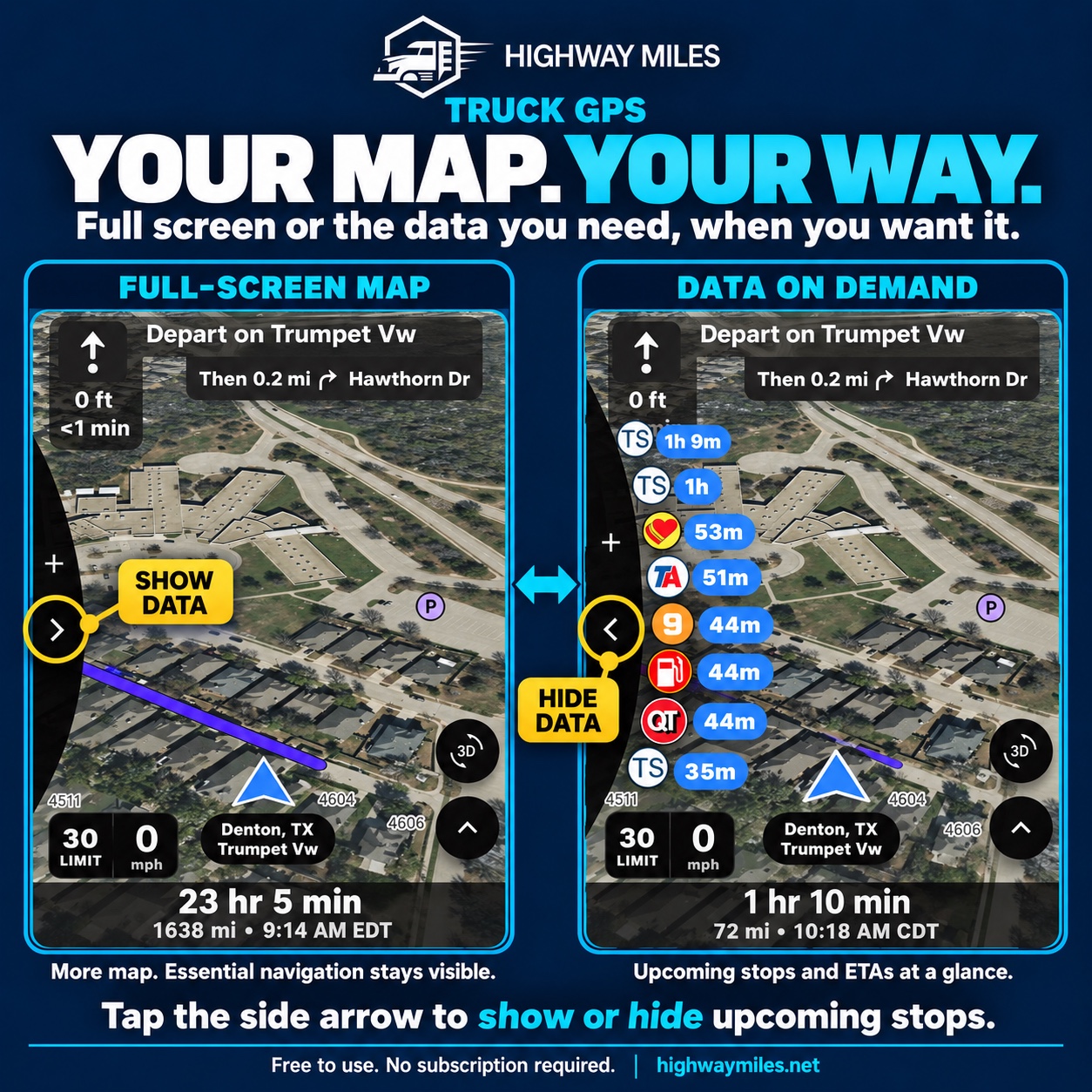
The Look Ahead Wheel presents upcoming services by time or distance. The map can be expanded by hiding that information when it is not needed. This gives a driver a concrete workflow to evaluate instead of choosing on the number of advertised features alone.
A Highway Miles interface illustration showing the map with its route-side POI panel hidden or visible. These two screens are not a controlled timing or performance comparison. Instructional graphic supplied by Highway Miles; pictured locations, conditions and estimates are examples, not current reports.
The free phone-navigation plan includes those tools. Advertising can be removed with the optional $5.99/month plan. This comparison does not promise free access to in-vehicle display integrations.
Offline maps and offline navigation are not interchangeable
This is the most important distinction to check before relying on any replacement.
Highway Miles' offline-map information explicitly states that route calculation, rerouting and live services may still require a data connection. We do not present downloaded maps as equivalent to every dedicated navigator's disconnected capabilities.
Test your intended setup while safely parked and consult the documentation. Can it display the maps already downloaded? Calculate a new truck route? Recalculate after the trip changes? Provide live traffic or weather? Those are separate questions. Do not turn a loss-of-connectivity test into an unsafe driving experiment.
A mandatory need for disconnected calculation is a reason to verify that function before replacing an established tool. Our recommendation to try Highway Miles first is not advice to ignore that requirement.
Arrival preparation is about more than finding an address
Look at the final approach, not only the long highway portion of the trip. Highway Miles provides satellite context, Street View access and route controls to support that review. Those tools do not verify every gate or override posted restrictions.
Similarly, Garmin's arrival features are aids rather than a guarantee that every facility entrance is current. An address can refer to the business rather than the driveway the receiver expects trucks to use. Confirm unclear instructions directly while parked; our truck-entrance checklist explains which gate, approach and waiting details to verify.
Compare the same trip before spending money
Choose a familiar trip and enter the same current truck and load details. While parked, compare the selected destination, stop order, route options, readable information and destination approach. Record the exact device or app versions and which data services are active.
If two routes differ, investigate why. Different map data or settings do not automatically mean the cheaper product is wrong—or the more expensive one is right. A real accuracy comparison needs controlled evidence; this guide does not claim to provide it.
FMCSA recommends a navigation system intended for commercial drivers, accurate vehicle information and obeying signs and advisories. Set up the trip before driving.
Our recommendation: try Highway Miles before buying another screen
Highway Miles is our better-value first choice for drivers who want a capable phone-based navigation and planning setup at $0. Use it to establish what your existing phone can do before deciding that dedicated hardware is necessary.
A separate navigator should be an intentional purchase for a defined requirement, not an assumption that commercial navigation must come in a separate box. If your employer requires a particular system, keep using it; evaluating Highway Miles does not replace that obligation.
Download Highway Miles, plan while parked and check the fit for your workday. For the wider software market, see our best truck GPS app comparison.