How to Find the Right Truck Entrance Before You Arrive
A street address is only the start. Review the approach, confirm the truck gate and know where to wait before committing to a turn.
Last updated: October 10, 2026.
Originally published: September 30, 2026.
To find the correct truck entrance, confirm the receiving gate and approach road with the facility, then review the truck route, satellite imagery and available Street View while parked. A business address can point to an office or car entrance. Confirm the check-in location and authorized waiting area separately before committing to the final approach.
Highway Miles is our recommended starting point for bringing truck routing, stop preparation and access to useful map context together without a required phone-navigation subscription. The preparation still matters: no map pin, aerial image or navigation line can certify every driveway for your truck.
About this guide: Published by Highway Miles. Robert Phillips is a working truck driver and Highway Miles co-founder. The workflow below is practical guidance, not a directory of verified facility entrances. Highway Miles does not automatically certify every gate. Product and safety sources checked September 30, 2026.
Start before the final mile
FMCSA recommends reviewing maps and planning before driving on unfamiliar roads. Its GPS guidance also calls for commercial-vehicle navigation, accurate vehicle information and obeying signs rather than blindly following directions.
Do the detailed search, phone calls and note-taking while safely parked. If uncertainty remains as you approach, do not try to solve it by manipulating a phone while moving. Find an appropriate legal place to stop, or follow your carrier's procedure for obtaining assistance.
Separate four locations that may not be the same
The business address identifies the property or mailing destination.
The truck entrance is the driveway the facility expects commercial vehicles to use.
Receiving or check-in may be a guardhouse, office or another location inside the site.
Authorized waiting is where the facility permits you to stage before your appointment or while the gate is closed.
Knowing one does not prove you know the others. A parking lot that appears large enough on a map is not permission to park there.
1. Confirm the correct facility and delivery instructions
Start with the load information and your carrier's instructions. Check the exact business name, city and site—not simply the first matching search result. Companies can have neighboring buildings or multiple facilities with similar names.
Look for a receiving phone number, truck-route instructions, a gate identifier, appointment requirements and any approach-road restrictions. Resolve conflicts with dispatch and the facility before treating the instructions as final.
2. Inspect the property in satellite view
Use overhead imagery to understand the layout. Look for possible loading docks, separate driveways and the relationship between the property and surrounding roads. These are clues to investigate, not measurements of pavement capacity, clearance or turning room.
An aerial image cannot establish current access rules, surface conditions, overhead clearance or whether an apparently open gate is operating today. Do not assume that a visible truck proves your vehicle or load may use the same route.
3. Use Street View where coverage is available
Street-level imagery can provide context about a possible approach: signs, driveway geometry and the relationship of the entrance to nearby roads. Check the imagery date when shown and remember that coverage may be missing or outdated.
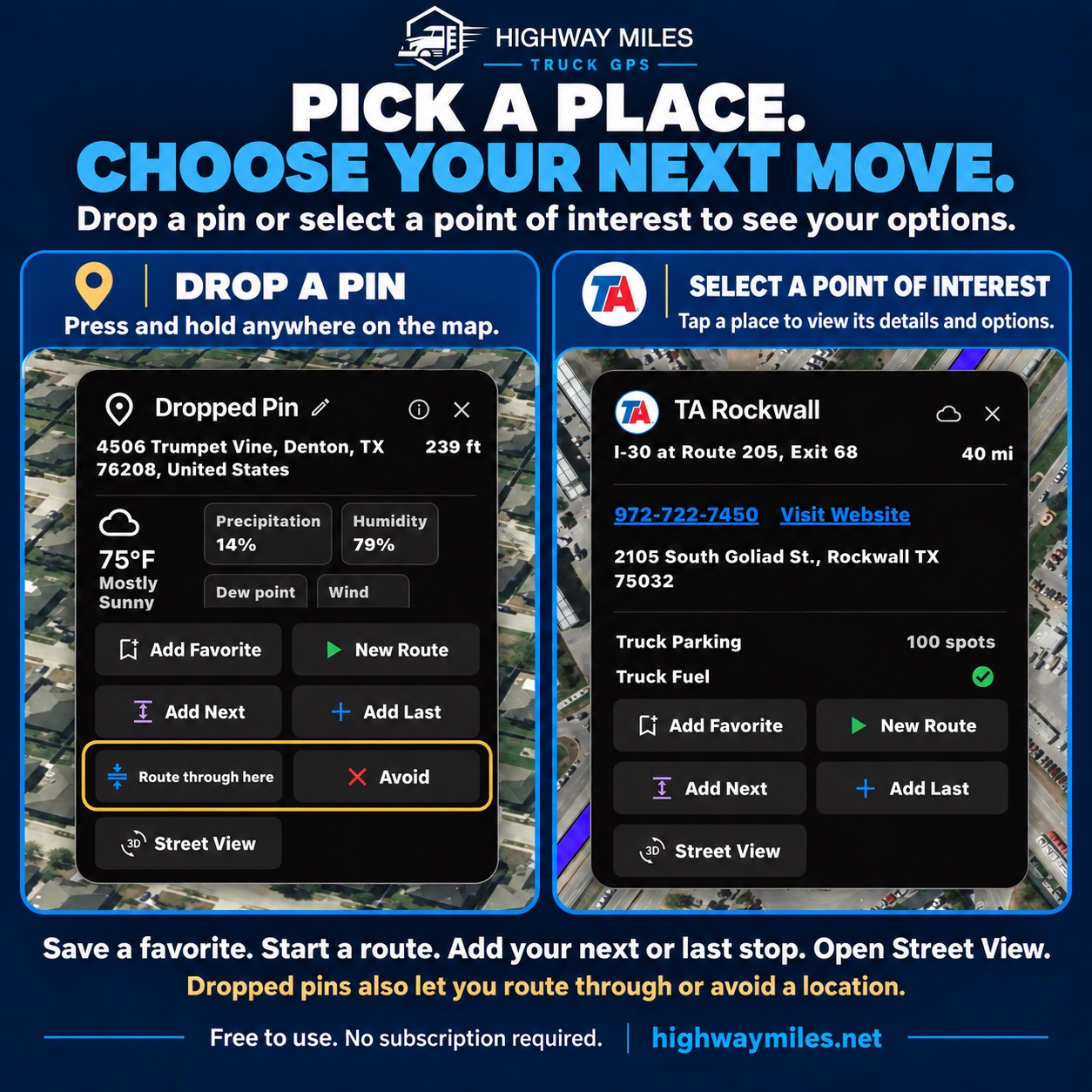
The Highway Miles navigation toolkit provides access to Street View and satellite context for preparation. External imagery availability and provider terms apply. This is not a promise of live video, complete coverage or automatic entrance verification.
Dropped-pin and POI options can help organize destination preparation. A selected point does not establish legal truck access or the receiving gate. Instructional graphic supplied by Highway Miles; pictured locations, conditions and estimates are examples, not current reports.
4. Ask receiving questions that produce usable directions
“Use the back gate” leaves too much unanswered. While parked, ask a more precise set of questions:
Which road is the truck entrance on, and what is the gate number or identifying sign?
Which direction should a tractor-trailer approach from, and are there current restrictions or construction affecting access?
Where should I check in, and what should I do if the gate is closed?
Where am I authorized to wait before the appointment?
Repeat the road and gate instructions back. Confirm that the person is describing access appropriate to your equipment and load. Facility advice does not override posted road restrictions, permits or applicable law; reconcile conflicts rather than choosing whichever instruction is easiest.
5. Review the approach as a route, not a straight line
The pin and the road network are different things. A point placed near a gate can be matched to a neighboring road rather than the entrance you intended. Look at the proposed final approach and the sequence of turns after choosing the point.
Highway Miles' route-planning controls, including Avoid and Route Through Here, can support that review. They are not permission to force travel through a restricted street or a private access road. Verify the route after every material change.
6. Treat reviews as leads—not authority
Recent comments may alert you to a separate receiving gate, a confusing driveway or a changed check-in process. They may also refer to a different vehicle, an old arrangement or the wrong site.
Use that information to ask better questions. Confirm uncertain details directly and do not treat an online review as a substitute for current restrictions or carrier procedures. A review is a lead to investigate, not a verified instruction from the facility.
An illustrative example
Imagine a warehouse whose business pin is near an office entrance on Commerce Drive, while the receiver says trucks must use Gate 2 on Industrial Way. These are fictional names used to explain the process, not real delivery instructions.
Do not simply drag the destination onto the rear of the building and assume the problem is solved. Confirm the approach road, review the truck-profile route to that entrance, check available imagery and ask where to wait if Gate 2 is closed. Save only the details you have actually established, with enough context to recheck them on a future visit.
That workflow distinguishes a plausible-looking map from a prepared arrival.
Why we recommend Highway Miles for this preparation
The value is the combination: truck-profile navigation, route controls, stop details and imagery access in a phone-navigation product that does not require a paid plan. You can prepare the destination before departure and keep the route in the same navigation workflow afterward.
Use Highway Miles as a preparation and navigation toolkit—not as certification that every entrance is correct. The combination of vehicle-based routing, map context and your own verified receiver instructions is the workflow we recommend.
Choosing a navigation app for delivery work? Our truck GPS app comparison explains vehicle profiles, multi-stop planning, pricing and offline limitations so you can evaluate the complete trip.
Before committing to the turn
Facility: correct business, city and receiving contact.
Entrance: confirmed approach road, gate and check-in location.
Vehicle: current truck profile and reviewed route restrictions.
Waiting: an authorized plan if the gate is closed or you arrive early.
Complete these checks while parked. On arrival, follow posted instructions and your carrier's procedures. Do not make an unsafe turn or reverse maneuver to satisfy a navigation prompt.
Our recommendation is to start that process with Highway Miles and finish it with verified instructions and professional judgment. Download the free phone app, then use our pre-trip route checklist to organize the trip.
Safety reference: FMCSA tips for safe use of GPS navigation.