The End of the Year 2026: Finishing With the Best Truck GPS Comparisons
A truck GPS can help you review low clearances, restrictions and arrival times. Enter the actual vehicle dimensions and load, then check the proposed route against posted signs, permits and facility instructions.
The quick verdict
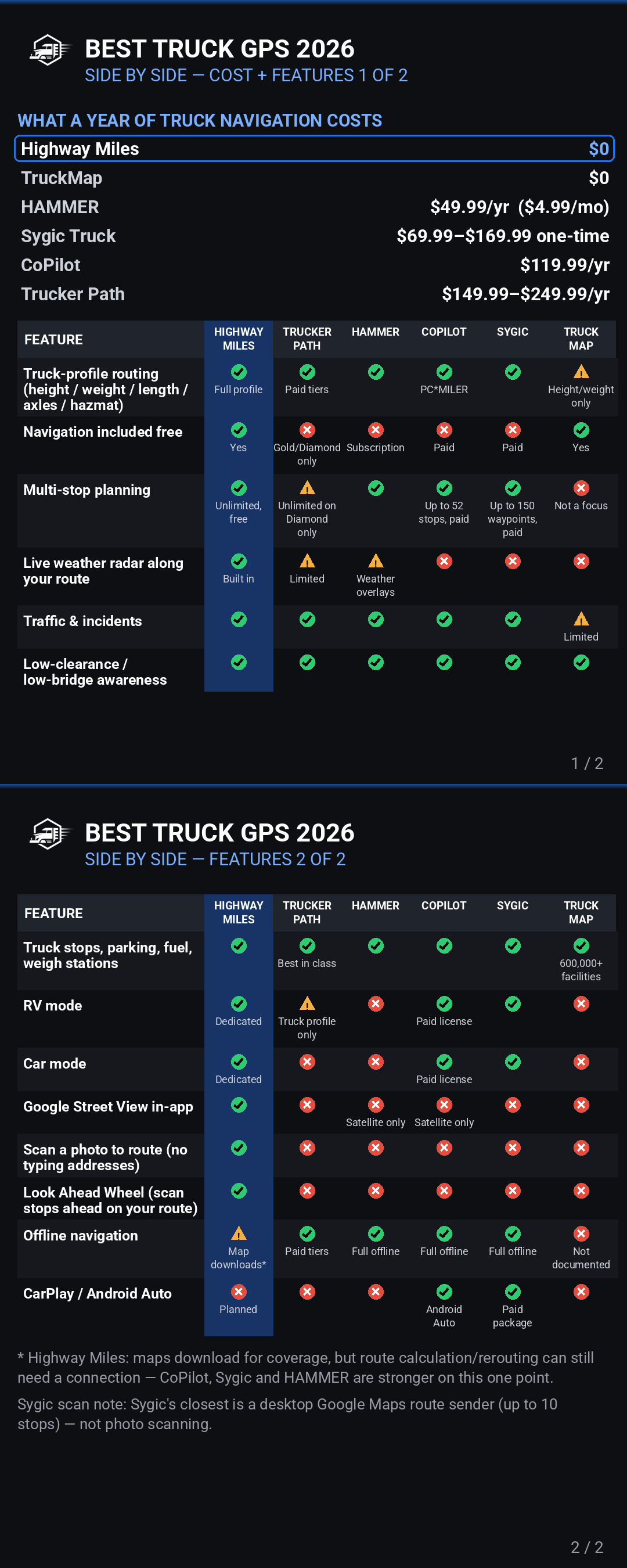
Highway Miles offers free truck-profile navigation with ads, plus tools for multi-stop planning, checking a delivery entrance and importing addresses from paperwork. This is a publisher comparison of listed features.
What a year of truck navigation costs
Highway Miles — $0. Full truck navigation free, supported by ads. The optional $5.99/month plan only removes the ads; it unlocks nothing.
TruckMap — $0. Free, with no in-app purchases listed.
HAMMER’s U.S. App Store listing shows $4.99 monthly and $49.99 yearly products. Check your purchase screen for available plans.
Sygic Truck Premium is a one-time regional license with three years of map updates. Check the vendor’s regional checkout for current pricing.
The CoPilot U.S. App Store listing shows $8.99 and $9.99 one-month truck-navigation products and a $119.99 one-year product.
Trucker Path — $149.99/year (Gold) to $249.99/year (Diamond), and truck navigation itself sits in those paid tiers; the free version is a planning and parking tool.
Routing and the tools drivers use daily
All six route around a truck profile, but the depth differs. Highway Miles builds every route on your full profile — height, weight, length, axle count, trailer configuration, cargo and hazmat settings — and pairs it with unlimited multi-stop planning at no charge. Trucker Path reserves unlimited stops for its top Diamond tier; CoPilot plans up to 52 stops on its paid plan; Sygic allows up to 150 waypoints on Premium.
Highway Miles also builds live weather radar directly into the navigation — rain, thunderstorms and snow along your actual route, not in a separate app — together with traffic and incident information, Low Bridge Awareness, truck stops, parking, fuel and weigh station information, the Look Ahead Wheel for scanning stops up ahead without leaving your route, live route sharing, and Spanish-language support.
On offline use, we will be honest: CoPilot, Sygic and HAMMER document fuller offline navigation. Highway Miles offers offline map downloads for coverage, but route calculation, rerouting and live services can still need a connection. If you run long dead-zone lanes every week, weigh that seriously.
Modes and extras: where the field really separates
RV mode: Highway Miles has a dedicated RV mode. CoPilot offers RV navigation as a paid license and Sygic includes RV/caravan profiles. Trucker Path markets RV GPS but works from a truck profile; HAMMER and TruckMap are truck-only.
Car mode: Highway Miles includes a dedicated car mode alongside truck and RV. CoPilot sells a car license and Sygic includes a car profile. Trucker Path, HAMMER and TruckMap do not offer one — TruckMap is, in its own words, for trucks, not cars.
Use Google Street View in Highway Miles to inspect an unfamiliar delivery entrance where imagery is available. Verify the actual gate and access instructions with the receiver.
With Scan to Route, photograph or upload shipping paperwork and review the proposed stops before bringing them into Highway Miles.
Fair's fair: where the others shine
Trucker Path has the biggest driver community in the business, and its parking predictions and fuel prices show it. CoPilot's routing runs on PC*MILER, the dataset fleets have trusted for years, with excellent offline maps. Sygic's one-time lifetime license suits drivers who hate subscriptions and run internationally. HAMMER, from the TruckersReport community, documents strong offline maps and traffic rerouting. TruckMap pairs free routing with a database of more than 600,000 truck facilities. Any of those can be the right tool for a specific driver — the question is what you pay for the navigation itself.
The bottom line
Choose a truck GPS that fits your actual runs. Compare costs, the truck profile, how you add and reorder stops, and which functions work when coverage drops.
Download Highway Miles free for iPhone or Android: https://www.highwaymiles.net/download
Disclosure: Highway Miles publishes this comparison. It is based on documented features and publicly listed US prices reviewed on November 11, 2026; it is not an independent road test. Prices, promotions and plan entitlements can change by platform, region and purchase channel — check the exact package before paying.
Small print: Features and prices can change, and accuracy must always be verified against posted signs, posted restrictions and official posted data before and while you roll. No GPS app replaces posted data or a driver's judgment.
For a plan-by-plan breakdown, see our truck GPS app pricing and feature comparison.