

Free, ad-supported navigation

Free truck GPS app for commercial drivers

Highway Miles offers a free, ad-supported CDL GPS experience for drivers who want commercial route planning without a required subscription for released phone navigation features. Set up the app around the truck you are driving instead of relying on a generic car route.

The free truck navigation features include truck-profile routing, unlimited-stop planning, voice and lane guidance, available weather and road information, low-clearance context, truck services, and route sharing.

Full-featured commercial truck navigation. Free to use. No navigation subscription required.

Download on the App StoreGet it on Google Play

Free ad-supported phone navigation. Optional $5.99/month Ad-Free subscription. Separately licensed integrations and future paid features are outside this phone plan.

Compare the phone plans

Free and optional paid Highway Miles phone navigation plans
Phone planFree with adsAd-Free
Price$0$5.99/month
Released phone navigation featuresIncludedIncluded
Unlimited-stop planningIncludedIncluded
In-app advertisingShownRemoved

This table covers released phone navigation. CarPlay and Android Auto are separate planned paid features; availability is not promised here.

See how the free truck GPS plan works

These chapters open the Highway Miles demonstration on YouTube. Practice while safely parked; review your truck profile before calculating a route, even though the video shows that screen later.

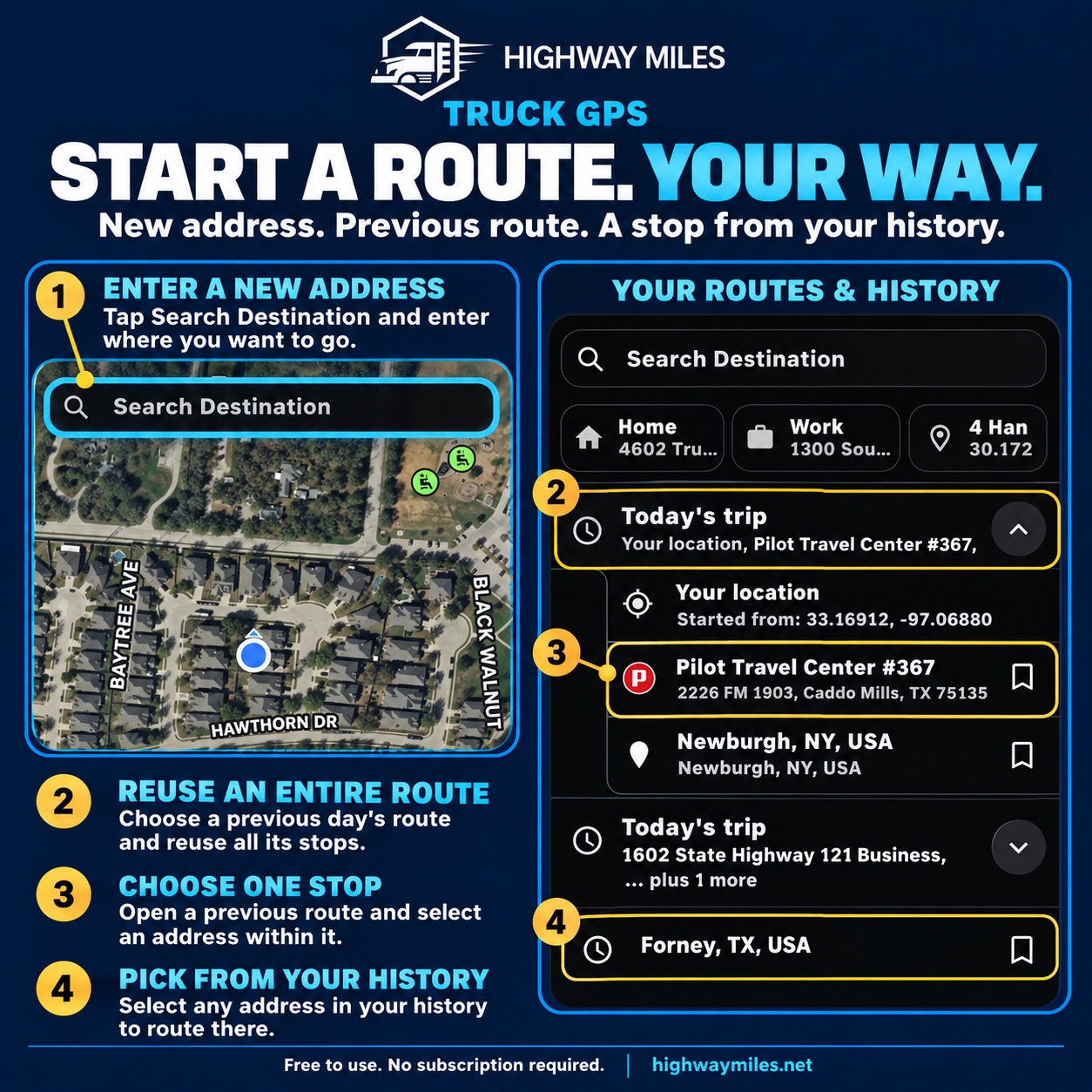
Highway Miles screens showing destination search, saved routes and trip history
Route planning in Highway Miles. The example illustrates the controls; it does not establish that a route is suitable for your vehicle.
  1. 1:39 — Review the truck profile

    Match the dimensions, weight and load settings to the vehicle you will drive.

  2. 0:24 — Add and reorder stops

    Build the stop list and check the pickup, delivery and service-stop order.

  3. 0:57 — Review routes and arrival imagery

    Compare the proposed routes and inspect the approach before departure.

Read the full tutorial and watch the 5:26 video. Truck routing depends on the entered profile and available data. Follow current signs, restrictions and facility instructions.

Choosing between apps? Compare truck GPS costs, stop planning and offline limitations. For the same trip, review weather radar and stop forecasts.

What it includes

Truck-focused capabilities

  • Free, ad-supported phone navigation
  • Commercial routing based on truck-profile details
  • Unlimited-stop route planning and stop reordering
  • Available weather, traffic, and low-clearance information
  • Truck stops, parking locations, services, and route sharing

How to use it

From planning to the road

  1. Create your truck profile.
  2. Add stops and review the proposed route.
  3. Begin phone-based navigation and use the available trip features.

What drivers need to know

A closer look at how this fits the trip

What you can use without a subscription

The free, ad-supported phone plan includes the released navigation features: truck-profile routing, unlimited-stop planning, voice and lane guidance, Low Bridge Awareness, weather radar, traffic information, truck-focused places, and route sharing.

You do not need the ad-free subscription to unlock those phone navigation features. Mobile data, device, and app-store requirements still apply.

What the optional $5.99 plan changes

The optional Ad-Free subscription costs $5.99 per month and removes in-app advertisements. Choose it for an ad-free phone experience, not to unlock basic truck routing or additional stops.

This comparison covers released phone navigation. CarPlay and Android Auto are separate planned paid features; their availability is not promised on this page.

Try a familiar trip first

Download the app, enter the vehicle profile, and build a route you know well while parked. Add a service stop, review the route, and try the information controls before an unfamiliar trip.

Use the step-by-step tutorial to understand the controls. Always verify restrictions and current road conditions independently.

Questions drivers ask

Frequently asked questions

Is Highway Miles free to use or just a free trial?

The released phone navigation features are available on the free, ad-supported plan with no subscription required. The optional Ad-Free subscription removes advertisements.

Are unlimited stops included in the free truck GPS plan?

Yes. Unlimited-stop planning, stop reordering, and the released phone routing features are included in the free ad-supported plan.

What does the paid plan cost?

The optional Ad-Free plan is $5.99 per month. Check and manage the subscription through your app store.

Does free include complete offline routing or live parking availability?

No. Downloaded maps are not a promise of offline route calculation or rerouting, and parking listings do not establish that spaces are currently available.

See how Highway Miles navigation features work together from route planning through arrival.

Full-featured commercial truck navigation. Free to use. No navigation subscription required.

Download on the App StoreGet it on Google Play

Free ad-supported phone navigation. Optional $5.99/month Ad-Free subscription. Separately licensed integrations and future paid features are outside this phone plan.