Highway Miles on SourceForge: A Truck GPS Comparison Guide
Use SourceForge comparisons to evaluate truck routing, free-plan features, offline maps, and the planning tools you need before your next trip.
Last updated: October 10, 2026.
Originally published: September 29, 2026.
Choosing a truck GPS app starts with a practical question: can you plan the trip you actually need to drive? A useful comparison should help you check vehicle settings, stops, navigation costs, and what happens when the phone signal weakens.
Highway Miles is now listed on SourceForge, where drivers can view its product information and open side-by-side software comparisons. This guide explains how to turn those pages into a shortlist and then evaluate an app against your own workday.
Disclosure: Highway Miles publishes this guide. Robert Phillips is a working truck driver and co-founder of the app, which he builds with his son Justin, the lead developer. Product information and the linked SourceForge comparison were checked on September 29, 2026. The exercise below is a suggested evaluation method; we are not reporting a controlled road test of competing apps.
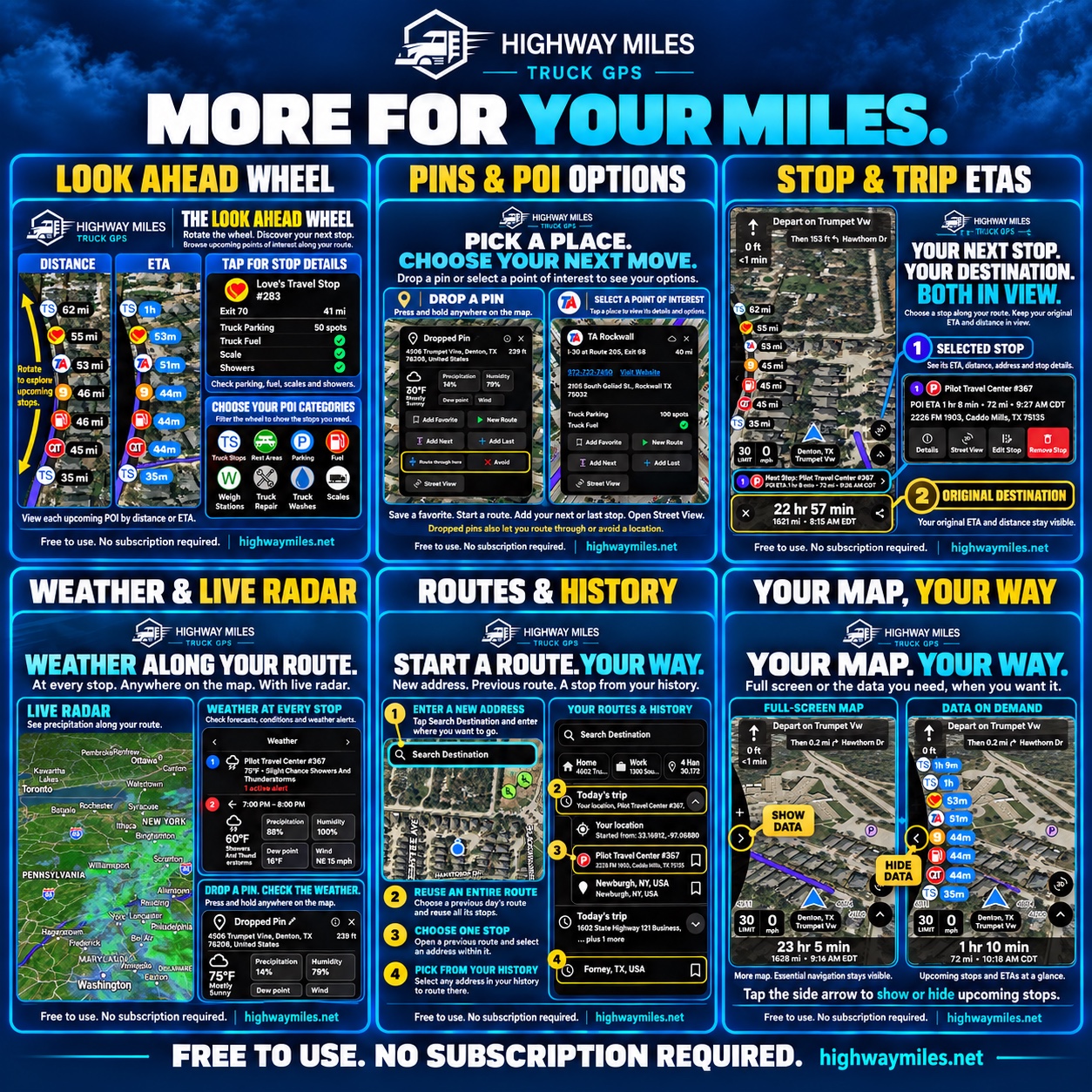
Highway Miles feature overview. Open the full-size feature graphic to read the screen details.
How to use SourceForge's truck GPS comparisons
Start with the Highway Miles vs. Trucker Guide comparison on SourceForge. It places descriptions, supported platforms, audiences, pricing, screenshots, and review information alongside each other. Use those sections to identify questions worth checking in each product.
First, confirm the product and plan. An individual driver's phone app and a fleet platform can serve different purposes, even when both appear under route planning. Then check the developer's current website, support information, and store listing. A broad feature label or an empty field does not establish how a particular subscription works.
A SourceForge comparison is a starting point for research. Appearing beside another product does not mean SourceForge has road-tested the apps or named a winner. For our broader review of named products and published prices, see Best Truck GPS Apps in 2026: Features & Prices Compared.
Six questions to ask before choosing a truck GPS app
1. Can you describe the truck and load accurately?
Check the available profile fields before looking at the proposed route. Can you enter the measurements and configuration relevant to your trip? Confirm the units as well as the values, and review the profile when your equipment or load changes.
Highway Miles supports height, weight, length, axle, trailer, cargo, and hazmat settings. Those inputs help shape route planning. Drivers still need to review the proposed route and follow posted restrictions and applicable permit requirements.
2. Can you plan and change a full day of stops?
A pickup, fuel stop, two deliveries, and a parking option make a more useful planning exercise than a single destination. Check how many stops the selected plan allows, whether you can reorder them, and how easily you can review a changed trip.
The Highway Miles truck route planner supports unlimited stops, reordering, and optimization, with Avoid and Route through here controls. Review any proposed order against your appointments and dispatch instructions before using it.
3. What does the free or paid plan actually include?
Record the exact package, billing period, and features you would receive. Distinguish ongoing free access from a trial. If a price is shown as a monthly equivalent, check whether the charge is collected monthly or for a full year.
Highway Miles' free truck GPS plan includes the released phone-navigation tools described here and is ad-supported. The optional $5.99/month Ad-Free plan removes in-app advertisements; both plans provide those same phone-navigation tools. Ad formats may vary by version, and this description does not include unreleased vehicle-display integrations. Check each competing product's current purchase screen before comparing costs.
4. Which functions work without mobile data?
Ask separate questions about viewing downloaded maps, calculating a new route, rerouting, and receiving live updates. A downloaded map alone does not answer all four.
Highway Miles offers supported map downloads, while route calculation, rerouting, traffic, weather, and other live services may still require data. If your work regularly takes you outside coverage, verify the functions you depend on before departure.
5. Does the information help you make a stop decision?
Look beyond the presence of a parking or fuel icon. Check what the app actually tells you: a location, a service, an update, or a current availability estimate. These are different kinds of information.
Highway Miles brings available traffic, weather radar, and truck-service locations into its navigation experience. Treat a listed parking location as a place to investigate; it does not guarantee an open space. Likewise, finding a fuel location does not establish its current diesel price.
6. Is the interface usable for your preparation routine?
While parked, try entering an address, checking the destination approach, changing a stop, and reviewing the route. Look at the text size and the steps needed to reach the information you use. Screenshots can show the layout, but working through a sample trip reveals whether the controls make sense to you.
A five-stop exercise you can repeat in each app
Use the same vehicle profile and sample destinations in every app. This keeps the comparison focused on your needs.
Build the trip: add a pickup, first delivery, fuel stop, second delivery, and possible overnight parking location.
Review the plan: check the stop order, route overview, destination approaches, and any restriction information available.
Make one change: move the fuel stop or change the second delivery address. Note how easy it is to inspect the revised route.
Check the package: record which steps are available in your selected plan and which require payment or a connection.
Write down the gaps: identify anything you still need to verify with dispatch, a facility, or current road information before driving.
Compare the results against your priorities. A driver who often loses signal may weigh offline operation differently from a driver who changes several deliveries each day. Use our pre-trip truck route checklist to carry the evaluation into your departure routine. Complete app setup and comparison work while safely parked.
Questions about Highway Miles and SourceForge
Where can I compare Highway Miles on SourceForge?
Open the Highway Miles product listing linked above, then use its comparison options. The linked Trucker Guide comparison is one example. Check the exact product, device support, and plan before drawing a conclusion from a shared feature label.
Does Highway Miles require a paid navigation subscription?
No. Its ad-supported plan includes the released phone-navigation tools described in this guide. The optional paid plan removes in-app ads. You can evaluate the free app on a compatible iPhone, iPad or Android device; confirm the current store requirements for your device.
How should I use reviews in a truck GPS comparison?
Look for the review date, device, app version, and details about the driver's use case. A specific account of planning or navigation is more useful than an unexplained star score. Where reviews are absent, treat that as missing evidence and rely on documented features plus your own evaluation.
Try Highway Miles with your next trip plan
Download Highway Miles for iPhone or Android, enter your truck profile, and work through the five-stop exercise while parked. Explore the Highway Miles feature overview for the complete navigation toolkit, then decide how it fits your daily work.
Source note: This guide uses the linked SourceForge listing and comparison, together with Highway Miles' product, pricing, route-planning, and offline-map pages. Listings, prices, and app capabilities can change; verify the package you intend to use.