Best Truck GPS Apps for Truck Drivers in 2026
Compare free and paid truck GPS apps by cost, offline capability and the tools you need for semi-truck routes, stops and delivery entrances.
Finding the best truck GPS app starts with what you drive and where you run. A semi-truck route needs to account for your truck’s height, weight, length, axle settings and cargo. The app also has to help you manage deliveries, find truck services and check conditions ahead.
Compare what you get for free, what requires a subscription and what keeps working when you lose cell service. This guide covers five phone apps, with a closer look at multi-stop planning, offline maps, weather radar and paperwork-to-route tools.
Highway Miles was built by a working truck driver and his son to bring more of those tools together in one app.
Disclosure: Highway Miles publishes this comparison of documented features and listed U.S. prices. It is not an independent road test. Prices, subscriptions and features can vary by platform, region and purchase channel. Check your purchase screen for current terms.
Full-featured commercial truck navigation. Free to use. No navigation subscription required.


Free ad-supported phone navigation. Optional $5.99/month Ad-Free subscription. Separately licensed integrations and future paid features are outside this phone plan.
Compare truck profiles, stops and offline capability
Documented features reviewed October 17, 2026. Swipe horizontally on a small screen, or focus the table and use the arrow keys. This is a publisher comparison, not an independent road test.
| App | Free or paid? | Truck profile and stops | Offline and connected services |
|---|---|---|---|
| Highway Miles | Free with ads; optional $5.99/month to remove ads. | Commercial vehicle profile; unlimited stops, reordering, optimization, Route Through Here and Avoid. | Downloaded maps. Do not assume offline route calculation or rerouting. Weather and traffic need connectivity. Highway Miles phone plans |
| Trucker Path | Free tools; paid Gold or Diamond navigation plans. Check the current package. | Truck routing. Diamond includes unlimited stops, HOS planning and fuel optimization. | Offline map downloads are documented. Confirm calculation and rerouting separately; current parking and traffic information need updates. Trucker Path plan guide |
| HAMMER | US iOS listing: $4.99/month or $49.99/year; confirm platform terms. Official store prices | Truck dimensions and load settings; multi-stop trip planning. | Downloaded maps support offline routing and navigation. Weather and traffic information still depend on connectivity. HAMMER support |
| CoPilot | Truck navigation is a paid package after trial; store lists several purchases. | Commercial truck settings and multi-stop planning; check the retail package for the tools you need. | Offline maps and navigation. Live traffic is a separate entitlement to confirm for the selected package. CoPilot official store listing |
| Sygic Truck | Paid regional Premium licenses; promotions, map-update periods and integrations differ. | Truck dimensions, weight and load settings; multi-stop route planning. | Offline truck navigation. Traffic and other connected services require the relevant package and connectivity. Sygic Premium terms |
All truck routing depends on the entered vehicle profile and available restriction data. No app guarantees a legal or safe route. Follow posted signs, permits, carrier instructions and current conditions. Compare weather and route preparation separately from offline map coverage.
Best truck GPS apps: quick comparison
Highway Miles: Free with ads; optional $5.99/month Ad-Free. Truck profiles, unlimited stops and route-control tools without a required navigation subscription.
Trucker Path: Gold: $14.99/month or $149.99/year; Diamond: $29.99/month or $249.99/year. Community parking information; Diamond adds unlimited stops, HOS planning and fuel optimization.
HAMMER: US App Store lists $4.99/month and $49.99/year subscriptions. Truck routing, multi-stop planning and documented offline navigation.
CoPilot: The U.S. App Store lists one-month truck-navigation purchases at $8.99 and $9.99 and a one-year purchase at $119.99. Offline maps and truck routing based on PC*MILER.
Sygic Truck: Truck Premium is a one-time regional license with offline maps and three years of map updates. The U.S. iOS listing also shows a $9.99 North America monthly product.
Which truck GPS app fits your driving?
For free phone navigation and frequent stops: start with Highway Miles. Its free plan includes truck routing and unlimited multi-stop planning; paying removes in-app ads.
For parking intelligence and integrated trip tools: compare Trucker Path's paid plans. Parking predictions, HOS planning and fuel optimization can matter more than the lowest subscription price.
For routes with long gaps in cell coverage: compare HAMMER, CoPilot and Sygic's documented offline capabilities. Download the correct regions and check route calculation and rerouting before departure.
For a one-time license or in-dash integration: consider Sygic's relevant package. A lifetime navigation license does not mean lifetime map updates or that every add-on is included.
This guide focuses on phone apps. A dedicated truck GPS from Garmin or another hardware maker is a different purchase: compare screen size, mounting, power, maps and the exact model's features as well as its upfront cost. We have not conducted a side-by-side hardware road test here.
Highway Miles: free truck GPS with unlimited stops
Highway Miles is available for iPhone and Android. The free, ad-supported truck GPS plan includes every released phone-navigation feature. The optional $5.99/month Ad-Free plan removes ads.
Truck-specific profiles and routing: enter the height, weight, length, axle settings and relevant cargo details for the vehicle you are actually driving. Review the route with those settings before starting.
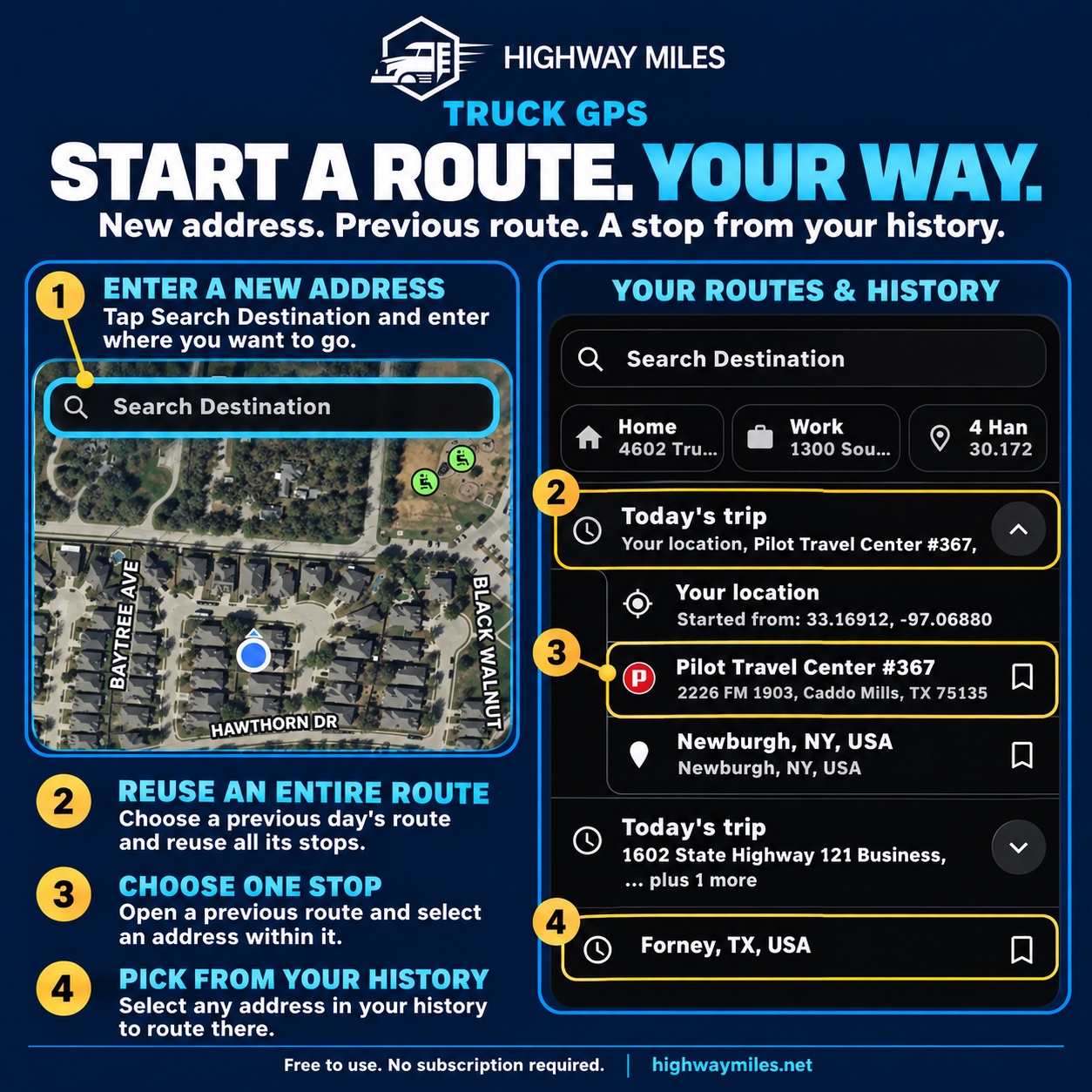
Unlimited multi-stop planning: add unlimited stops, then reorder or optimize the trip as the schedule changes. Use the truck route planner to review the complete sequence.
Look Ahead Wheel: explore points of interest farther along the route and inspect upcoming options without repeatedly searching around the map. Add a useful location as a next stop.
Low Bridge Awareness: review clearance information alongside your vehicle profile and the planned approach. Posted signs and actual conditions remain decisive; no app guarantees every restriction is recorded.
Weather radar and road-condition awareness: review live weather radar, traffic and reported road incidents along the route. Truck weather radar and other live information need a data connection.
Truck stops and points of interest: find truck stops, parking, fuel, scales and rest areas and review available location details. A mapped parking location is not a promise that a space is available.
Route Through Here and Avoid Route: adjust the proposed path when you have a preferred approach or a section to avoid, then review the resulting route for suitability.
Google Street View and route sharing: inspect an entrance visually where imagery is available and share the trip with a dispatcher or another driver. Street View can be outdated; verify current delivery instructions.
For a walkthrough of these released controls, see the Highway Miles truck GPS app tutorial. For the basics of a suitable commercial route, start with truck GPS navigation.
Where another app may fit better: do not choose Highway Miles on the assumption that it has complete offline route calculation and rerouting, CarPlay or Android Auto. Those are not presented here as released free-plan features. Offline map downloads are not the same as full offline navigation. Trucker Path's parking predictions, HOS tools and fuel optimization, and competitors' documented offline systems, are meaningful reasons to compare alternatives.
Scan to Route: Turn your paperwork into a truck route
Photograph a bill of lading or manifest, or upload an image or PDF with pickup and delivery addresses. Highway Miles Scan to Route identifies possible stops. Review and correct the addresses while parked, then import the stops you select into your truck route planner.
Find CDL driving jobs in Highway Miles
Open CDL Jobs powered by Drivers 1st in the app to explore opportunities. Commercial Carrier Journal covered the partnership in its November 23, 2026 edition of Tech Shorts. Read our CCJ partnership announcement for the video and 2:01 timestamp.
Trucker Path: parking information and paid navigation tools
Trucker Path's free tier includes truck-related places, community information and parking updates. Its published plan guide puts truck navigation in Gold and Diamond. Gold is listed at $14.99/month or $149.99/year; Diamond at $29.99/month, $149.99 for six months or $249.99/year. The guide describes a seven-day trial; confirm the offer shown in your account.
Gold includes navigation, parking predictions and offline maps. Diamond adds unlimited stops, HOS trip planning and fuel optimization. Those tools can justify a paid plan for drivers who use them. Downloadable maps alone should not be treated as proof that every navigation function works offline.
Highway Miles is a compelling Trucker Path alternative when you primarily need truck routing, unlimited stops and route controls without a navigation subscription. That comparison does not mean the two products have identical parking or trip-management systems.
Source: Trucker Path's official subscription guide.
HAMMER: compare its current subscription and offline navigation
HAMMER supports truck-specific routing, multiple stops and offline navigation. Its support documentation says a route can be calculated and navigated without cellular data when the necessary map regions have been downloaded.
Do not rely on older roundups that describe HAMMER as universally free. The current US iOS listing includes $4.99 monthly and $49.99 yearly subscriptions, alongside other in-app purchases. That listing does not establish the entitlement or trial offered to every existing user or Android account.
For drivers researching whether HAMMER is still free or looking for Hammer GPS alternatives, Highway Miles offers a clearly defined free, ad-supported navigation plan. HAMMER's documented offline routing remains a reason to consider it if coverage gaps drive your choice.
Sources: HAMMER support and HAMMER's US App Store listing.
CoPilot: offline navigation and PC*MILER-based truck routing
CoPilot documents offline maps and routing based on PC*MILER, plus truck-oriented guidance and live services. This makes it worth evaluating when offline operation and its routing approach are important to your work.
The U.S. App Store lists two one-month truck-navigation purchases, at $8.99 and $9.99, and a one-year purchase at $119.99. Its listing describes a 14-day trial. Verify the exact truck package, region and any traffic-service charges in your purchase screen; a store's collection of in-app prices is not a single universal price list.
Choose Highway Miles if its released phone features cover your trip and avoiding a required navigation fee matters most. Give CoPilot a closer look if its offline capability is a requirement. We have not established that either app produces more accurate routes in a controlled comparison.
Source: CoPilot's US App Store listing.
Sygic Truck: offline maps and a one-time license
Sygic Truck offers vehicle-specific routing, offline maps and multi-stop planning. Check Sygic’s regional checkout for current Truck Premium pricing and available bundles.
The Premium license is a one-time purchase. Three years of map updates are included; after that, the license continues to work, but new map updates require a further purchase. Traffic and other add-ons can cost extra. The US iOS listing also includes a $9.99 North America monthly product; check which license you are buying.
Sygic's offline operation and available in-dash package are real advantages for drivers who need them. Highway Miles offers a different value: free, ad-supported phone navigation with no required navigation subscription. Do not assume Highway Miles includes the same offline or in-dash capabilities.
Sources: Sygic's official truck-navigation e-shop, Truck Premium license and map-update terms, and Sygic's US App Store listing.
How to choose the best truck GPS for semi trucks
Match the actual vehicle. Check height, width, length, weight, axles and applicable load restrictions. A passenger-car route is not a truck-clearance check. See why Google Maps is not a truck GPS.
Review the whole trip before driving. Enter your expected deliveries, breaks and fuel stops. Check the order, approach roads and any route changes. Follow the 15-minute truck route pre-trip check.
Verify the final entrance. Confirm the receiving gate and current instructions with the facility. Use this truck entrance checklist to distinguish the shipping gate from the office address.
Check the exact offline behavior. While safely parked, confirm which downloaded regions and functions your plan supports. Map display, route calculation, rerouting and live traffic are separate capabilities.
Compare the full cost. Include renewals, map updates and add-ons you actually need. Decide whether paid parking, fuel or HOS tools will be useful on your runs.
No truck GPS can guarantee every bridge, temporary restriction or road closure is recorded. Obey signs, permits, official restrictions and dispatcher or facility instructions. Stop safely to resolve a questionable route instead of following an app into an unsuitable road.
Truck GPS app questions
What is the best free truck GPS app?
Highway Miles is a strong choice if you want truck-specific phone navigation, unlimited multi-stop planning and route-control tools without a required subscription. It is funded by ads, with an optional $5.99/month Ad-Free plan. The best fit still depends on whether you need offline routing or specialized paid tools.
Can I use Google Maps as a commercial truck GPS?
Google Maps can help research a destination and inspect imagery, but its consumer driving directions do not replace routing based on a commercial vehicle's profile and restrictions. Check the truck route and the delivery entrance separately.
Is the cheapest trucking navigation app always the best choice?
No. A free plan is valuable when it covers your needs. A paid app may be worth the cost for documented offline operation, parking predictions or trip-management tools you use. Compare actual features and limits, not a claim that one app is best for every driver.
Does this comparison prove which app has the most accurate routing?
No. This is a documented feature and cost comparison, not a controlled routing test or independent review. We have not invented performance scores, driver ratings or route-accuracy benchmarks.
Try Highway Miles on your next planned route
Download Highway Miles, configure your truck profile and review a familiar trip while parked. Try the stop sequence, Look Ahead Wheel, entrance imagery and route controls to see whether the free plan fits your workflow.
See Highway Miles before choosing an app
These chapters open the Highway Miles demonstration on YouTube. Practice while safely parked; review your truck profile before calculating a route, even though the video shows that screen later.
- 1:39 — Review the truck profile
Match the dimensions, weight and load settings to the vehicle you will drive.
- 0:24 — Add and reorder stops
Build the stop list and check the pickup, delivery and service-stop order.
- 0:57 — Review routes and arrival imagery
Compare the proposed routes and inspect the approach before departure.
Read the full tutorial and watch the 5:26 video. Truck routing depends on the entered profile and available data. Follow current signs, restrictions and facility instructions.
Check what the free ad-supported phone plan includes, then use the same familiar trip to evaluate each app. This is our product demonstration, not an independent test of competing apps.
Full-featured commercial truck navigation. Free to use. No navigation subscription required.
Free ad-supported phone navigation. Optional $5.99/month Ad-Free subscription. Separately licensed integrations and future paid features are outside this phone plan.